Launching soon this site is a place for producers to showcase their best tracks. Sign up early.
SOUNDSPIN.FM

Crisp Mastering provides crisp, clean, digital, audio mastering services. Our specialties are Hip-Hop, House, Jungle, Breaks, Dubstep, Electro, Trance, Synth Pop & all forms of BASS MUSIC. Check us @ www.crispmastering.com
Sunday, November 27, 2011

SOME OF THE BEST FREEWARE VST'S OUT THERE...

#FreeAmp2 – Virtual Guitar Amp – huge number of amp, cab, speaker, eq and stomp combinations
PolyIblit – Subtractive Synth – fat, alias free oscillators! also check out Lazy Snake Electric piano
Crystal – Semimodular synth – very powerful
Asynth – Subtractive – gorgeous filter
UGO Synths – A whole buch of great free synths
Oatmeal – Subtractive Synth – flexible, skinnable, lots of presets on kvr
Synth 1 – Subtractive synth – classic, easy to learn, super low CPU use
Triangle - Subtractive Synth – great useful monophonic synth
Purple – FM Synth – also check out Unkown, and some of his other synths
NUBI3 - Organ and Rotary speaker
SFZ – soundfont player, also a brilliant sampler if u want to learn to use the xml based sampling format (very simple)
GVST effects – Quick, Straightforward collection of effects. Including an Autotuner. Please dont use it to make Cher vocals
dblue Glitch – Awesomely powerful beat mangler a la Aphex Twin. Seriously, its great.
DtBlkFx – Sound mangling FFT
Smartelectronix – A group of VST developers, all with different plugins, many of them free and good. Bram, Antti, DestroyFX, magnus(makes a great reverb), mda and mdsp all make nice stuff
Classic – kjaerhus audio’s free plugins – really nice
Wednesday, November 23, 2011
OUR FRIENDS @ BLUE CAT COME AGAIN WITH A GREAT FREEWARE FREQUENCY ANALYZER
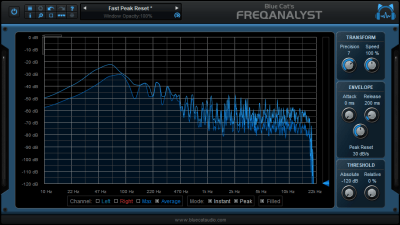
Most aspects of the audio to frequency display conversion can be managed, which lets you total control over the monitoring. A special thresholding system has been developed to help you see the important parts of the spectrum easily. In case you need extra precision in a particular frequency range, you can zoom the display and check the part of the graph you are interested in.
As shown in the screenshots, you can use the opacity management feature to make the plug-in window transparent and see what is behind: forget about your multiple display setup, you do not need it anymore! You can now check the spectrum of your mix and see your audio tracks behind. This feature is also particularly useful when you want to compare the spectrum of two tracks: just stack your two FreqAnalyst windows and see the difference!
This plug-in supports Blue Cat's skinning language, so that you can customize the user interface to your personal needs.
For more advanced capabilities, check Blue Cat's FreqAnalyst Pro plug-in, an extended version that offers many more features, such as saving/restoring curves, precise measurement tools, spectrogram view, MIDI output, better performance... For multiple tracks analysis, you can use Blue Cat's FreqAnalyst Multi plug-in.
Download: Mac AU / Mac RTAS / Mac VST / Win DX / Win RTAS / Win VST / Win x64 DX / Win x64 VST /Skins
Included in Bundle: Free Pack
Main Features:
- Mono and stereo real time spectrum analyzer.
- Total control over the audio to frequencies tranformation.
- Smart interpolation algorithm for extreme display smoothness.
- Zoomable display.
- The user interface can be made transparent.
- Custom absolute and relative thresholds.
Blue Cat Audio Standards:
- Available as: Mac-AU, Mac-RTAS, Mac-VST, Win-DX, Win-RTAS, Win-VST, Win x64-DX, Win x64-VST.
- Native DSP code for optimal performance.
- Skinnable user interface.
- Smooth Update: silent, zipper-free parameters update.
- Full automation support.
- No CPU load on idle: when the plug-in is fed with silence, the processing smoothly shuts down, to optimize the CPU usage of your Digital Audio Workstation.
- Real time MIDI control with advanced settings and MIDI learn.
- Smooth Bypass: activate/deactivate the plug-in with absolutely no noise.
- Undo/Redo.
- Import/Export presets in a host independent format.
- Any sample rate supported.
Tuesday, November 22, 2011
LEARN HOW TO MIX IN 3D STEVE HILLERS TIPS ON MASTERING REVERB

Master the use of reverb and your lifeless, two-dimensional mix will become a three dimensional panorama, says Steve Hillier.
Things that people do wrong with their music:
1. Write a composition starting with the drums. This is madness. Can you imagine Lennon and McCartney waiting for Ringo to set up his drum kit before writing their next Beatles smash? Obviously not.
2. Compress everything. At least twice. Anyone doing this in their mixes should stop now. Modern DAWs have an internal dynamic range that’s comparable to a pin dropping versus the sound of the big bang. Try using it, rather than squashing your music to the flatness of a pancake being sucked into a black hole . Compressors are like guns…only the sane should ever pick one up.
3. Use reverb badly, or not at all… Unlike compression, everyone likes reverb. How can I say this with such confidence? Because nearly everything you’ve ever heard has been covered with reverb. Everything. Reverberation is what you hear when the sound from an event, such as a gun shot, bounces off a reflective surface, such as a wall, and then into our ears. It’s a fundamental attribute of how we experience sound, and our brains have evolved to use the information contained in reverb to help us survive in our everyday lives. If we’re hearing lots of sounds with long reverb tails on them, that suggests we’re in a large room, such as a church. Lots of short ‘early reflections’, we’re probably in a small room. Everything we hear has some reverberation on it before it ends up in our ears (we’ll ignore scientists who work in anechoic chambers for today).
Too many novice programmers don’t know how to use reverb, so they shy away from it, leaving their mixes dryer than Stewart Lee. Or they go the other way and use completely the wrong reverb sound, and get wetter than a Michael McIntyre show. Maybe programmers are confusing acoustic size with acoustic impact? Imagine this text on your page is your tune:
This is your mix,
This is your mix with the correct use of reverb on it,
Here’s your mix with a little too much reverb on it,
And here it is with way too much!
Thursday, November 17, 2011
WIN FREE AUDIO MASTERING FROM CRISP MASTERING!

Crisp Mastering is calling all Hip-Hop & Electronic Music Artists & Producers to show off their skills. It’s time to win FREE Audio Mastering
Step 1. Create an account in the “My Account” section or use our integrated Facebook connect for a single click account set up.
Step 2: Like us on our Facebook page and post a direct link or a SoundCloud embedded track along with the user name you signed up with.
Make your track as creative as possible. We’re not necessarily looking for this most seasoned pro sounding track. We’re looking for cool creative ideas as well. All genres of digitally produced music are welcome.
Contest ends January 17th 2012. 4 Winners will be chosen on January 31st 2012 and awarded free Audio Mastering services from Crisp Mastering!
Best of luck,
Crisp Mastering Engineers
Subscribe to:
Comments (Atom)